The mobile app brings casino games, Aviator, and sports betting to your Android or iOS device with the same M-Pesa deposit options as the website. Download takes under 2 minutes, installation requires Android 6.0+ or iOS 12.0+, and you get access to 800+ games plus live betting markets on Kenyan Premier League and international fixtures.
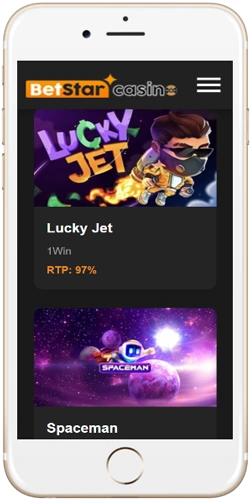
The app uses less data than browser-based play—roughly 30% reduction according to tests on Safaricom network. You also get push notifications for bet settlements and deposit confirmations, which don't work reliably on mobile browsers. Games load maybe 2-3 seconds faster due to cached assets, noticeable when switching between Aviator rounds or live blackjack tables.
Faster loading times and smoother animations compared to mobile browser
Real-time alerts for bet results, deposits cleared, and bonus offers
Browse game library and account history without active connection
Fingerprint and face recognition for quick secure access
Visit the site on your Android browser and tap the download button; the APK file (45MB) starts downloading immediately. You'll need to enable "Install from Unknown Sources" in Settings > Security if it's your first APK install outside Google Play—this is standard for gambling apps since Google doesn't list them. Locate the downloaded file in your Downloads folder, tap it and follow the prompts. Installation takes about 90 seconds on decent wifi or 4G. Open the app, log in with your existing credentials or create a new account directly through the app interface.
Search "Betstar Casino Kenya" in the App Store or use the download link from the website. The app weighs 52MB and installs like any normal App Store application—no special settings needed unlike Android. Tap Get, authenticate with Face ID or password and wait for installation to complete (usually under 2 minutes on stable connection). First launch requires accepting permissions for notifications and, optionally, location services for responsible gambling verification. Sign in using your web account details; all balances and betting history sync automatically.
Every game from the desktop site works on mobile—slots, crash games, live dealer tables, sports betting markets. M-Pesa deposits process identically to the website; enter your phone number, get the paybill reference, complete on M-Pesa app, funds appear in 5-10 minutes. Withdrawals follow the same timeframes (2-6 hours for M-Pesa on weekdays).
All 800+ slots from Pragmatic Play, Yggdrasil, Evoplay; crash games including Aviator, JetX, Spaceman; live dealer roulette and blackjack from Evolution Gaming with HD streams
Pre-match and live betting on football, basketball, rugby; bet builder for accumulators; cashout on selected markets; odds updates in real-time during matches
Deposit via M-Pesa, Airtel Money, cards; withdraw to mobile money or bank; view transaction history; update personal details; enable two-factor authentication
24/7 live chat accessible through app menu; email support with typical 2-4 hour response time; FAQ section for common issues like KYC verification and withdrawal limits
Android version needs to be 6.0 (Marshmallow) or newer—that covers basically any phone from 2016 onwards. You'll want at least 1GB free storage for the app plus cache; 2GB RAM minimum though 3GB+ recommended for smooth live dealer streams. iOS requires version 12.0 or later, compatible with iPhone 6s and newer models, all iPad models from 2017+. Both versions work on tablets but the interface really is designed for phone screens between 5-7 inches.
Data usage sits around 15-20MB per hour for slots and crash games, 40-60MB per hour for live dealer tables with video streams, 5-10MB per hour for sports betting depending on how many markets you browse. On Safaricom or Airtel 4G you shouldn't have issues; 3G works but expect slower game loading and occasional buffering on live tables. The app doesn't support offline gameplay for real money—you need connection to place bets and spin slots—but you can browse your account and transaction history without internet.
The browser version works fine if you don't want to install anything, though it lacks push notifications and uses slightly more data per session. App gives you biometric login which beats typing passwords every time, plus games stay in memory better—you can switch to WhatsApp mid-Aviator round and come back without the game reloading. Browser sometimes logs you out after 15-20 minutes of inactivity; app keeps sessions active longer.
| Feature | Mobile app | Mobile browser |
|---|---|---|
| Installation required | Yes (45-52MB) | No |
| Push notifications | Yes | No |
| Biometric login | Yes | No |
| Data usage | Lower (~30% less) | Higher |
| Game loading speed | 2-3 seconds faster | Standard |
| Session persistence | Longer | Shorter (15-20 min) |
| Offline browsing | Account history only | None |

 Download for Android
 Download for iOS